 Flaz
FlazUnderstanding the Auto-Renew Service System
Worried about forgetting to pay your VPS or Hosting bill? Learn how the Auto-Renew feature works at Flaz Cloud to keep your services active automatically as long as your account balance is sufficient.
Ever worried that your VPS or hosting service suddenly goes down because you forgot to pay the bill? At Flaz Cloud, you don't need to worry about that because there's a feature that can automatically extend your service's active period as long as your account wallet balance is sufficient.
This feature is very helpful to keep your website or application online without interruption just because of payment delays. You're free to set which services you want to auto-renew or which ones you want to manually disable according to your needs.
Finding the Auto-Renewal Settings Menu
To start configuring this feature, first please log in to your Flaz Cloud dashboard. Look at the menu list on the left side. You can select the service category you're currently using such as the Server, Applications, Hosting, Email, or Domain menu.
If you're a new user and don't have any services yet, you can start by following the guide How to Register a Flaz Cloud Account so you can access the main dashboard and start subscribing.
Using the Auto Renew Button
After entering the service list page, you will see a table containing information about the application name, status, domain name, and the service expiration date. Pay attention to the rightmost column titled Auto Renew.
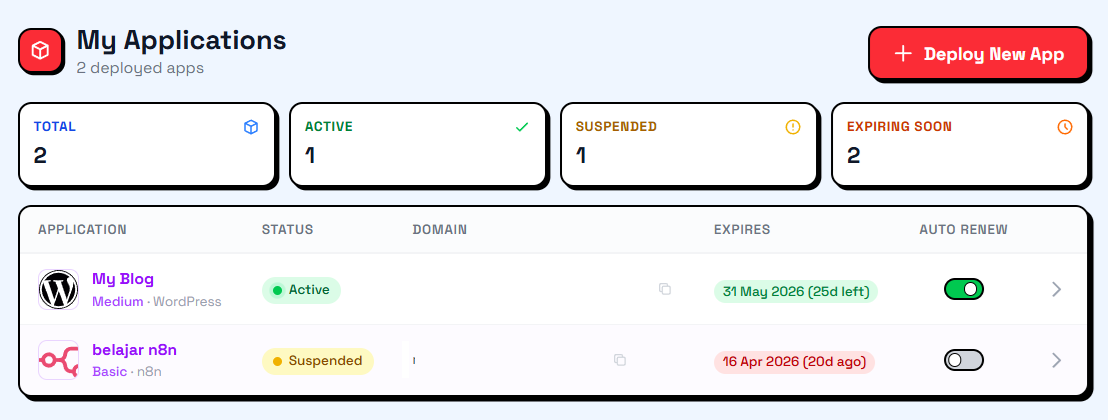
In that column there is a slider button or toggle switch that is very easy to use.
-
If the button is green and says On, it means the auto-renewal feature is active. Your wallet balance will be automatically deducted when the active period is about to expire.
-
If the button is gray and says Off, then this feature is disabled. You must pay the bill manually to prevent your service from being suspended.
You just need to click the button to change your choice. There's no complicated process because the changes will be saved immediately by the feature.
What You Need to Prepare
For this feature to work smoothly, make sure your wallet balance is always sufficient before the service expiration date arrives. This feature won't be able to extend the active period if the money in your account is less than the monthly subscription price. We recommend you regularly top up your balance in advance or keep a reserve balance in your account wallet.
Also make sure your email is correct so that successful or failed renewal notifications can go directly to your email. You can ensure your email is active by following the steps in How to Verify Your Flaz Cloud Account Email for your account security.
By activating this feature, you can focus on running your business without having to constantly check the billing calendar every month. If at any time you want to stop using the service, simply slide the button back to the off position before the due date arrives so your balance won't be deducted.
Was this article helpful?